Deployment Topology
This document describes the container architecture, network configuration, GPU passthrough, and resource allocation for the Home Security Intelligence system.
Container Architecture
All services run as containers on a single Docker/Podman network (security-net), enabling service discovery by container name.
Deployment Mode Options
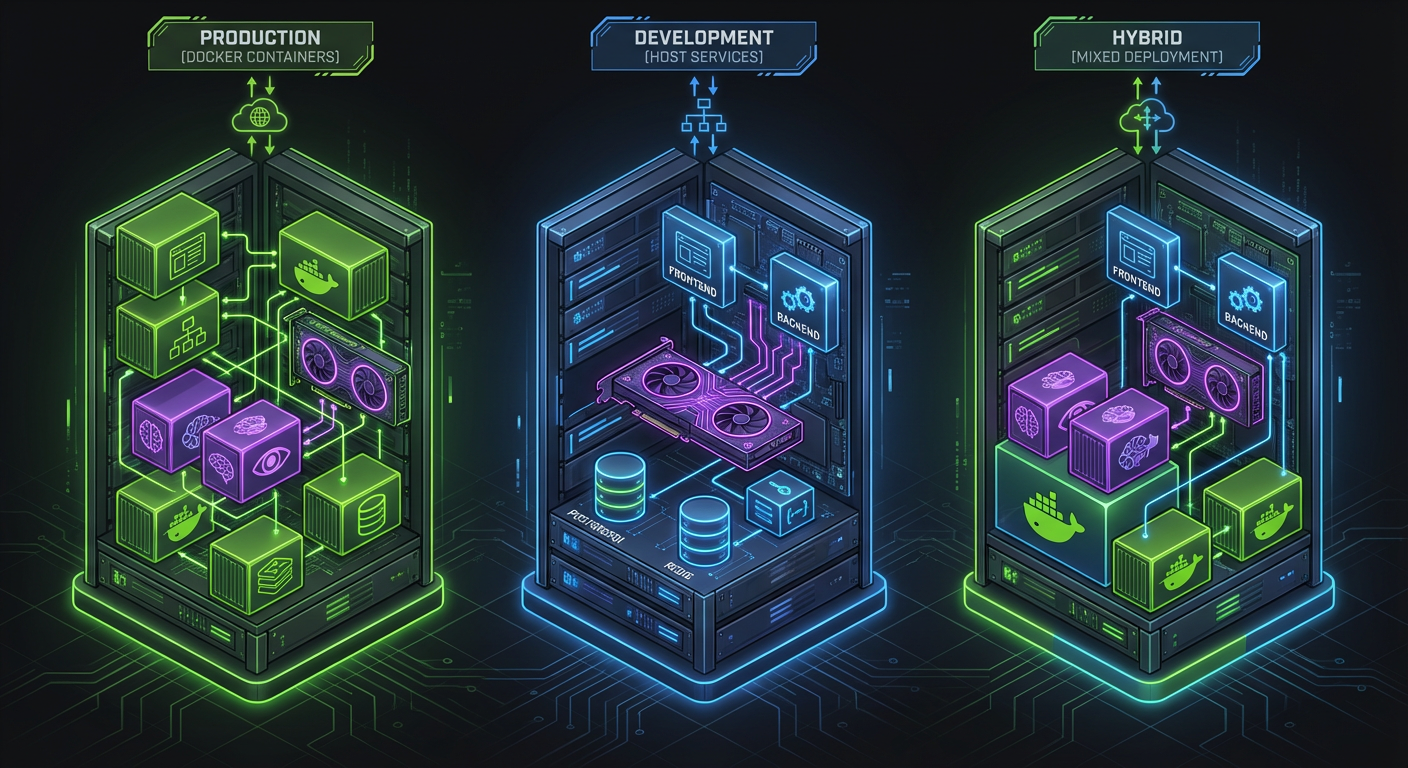
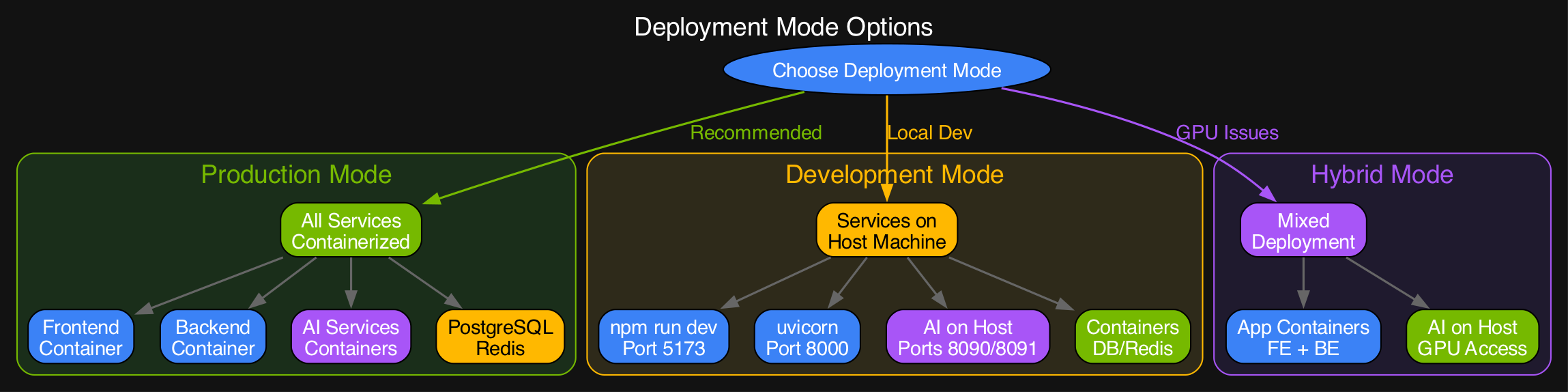
flowchart TB
    subgraph Host["Host Machine (GPU Server)"]
        subgraph Network["security-net (bridge)"]
            subgraph Core["Core Services"]
                FE["frontend<br/>:8080"]
                BE["backend<br/>:8000"]
            end

            subgraph Data["Data Layer"]
                PG["postgres<br/>:5432"]
                RD["redis<br/>:6379"]
            end

            subgraph AI["AI Services (GPU)"]
                GW["ai-gateway<br/>YOLO26 / Florence-2 /<br/>CLIP / Enrichment<br/>:8090"]
                LLM["ai-llm<br/>Nemotron (llama.cpp)<br/>:8091"]
            end

            subgraph Mon["Monitoring"]
                PROM["prometheus<br/>:9090"]
                GRAF["grafana<br/>:3002 host<br/>(container :3000)"]
                TEMPO["tempo<br/>:3200"]
                ALERT["alertmanager<br/>:9093"]
                LOKI["loki<br/>:3100"]
                PYRO["pyroscope<br/>:4040"]
                ALLOY["alloy<br/>:12345"]
            end
        end

        GPU["NVIDIA GPU<br/>(via CDI)"]
    end

    FE <--> BE
    BE <--> PG
    BE <--> RD
    BE --> GW
    BE --> LLM
    GW --> GPU
    LLM --> GPU
    PROM --> BE
    GRAF --> PROM
Network Configuration
Source: docker-compose.prod.yml:1388-1390
External ports are the .env.example defaults (bind address 127.0.0.1 unless noted).
| Service | Internal Port | External Port | Protocol |
|---|---|---|---|
| frontend | 8443 / 8080 | 8444 / 8080 | HTTP/HTTPS |
| backend | 8000 | 8000 | HTTP/WS |
| postgres | 5432 | 5432 | TCP |
| redis | 6379 | 6379 | TCP |
| ai-gateway | 8090 | 8090 (+8002 metrics) | HTTP |
| ai-llm | 8091 | 8091 | HTTP |
| prometheus | 9090 | 9090 | HTTP |
| grafana | 3000 | 3002 | HTTP |
| tempo | 3200 | 3200 | HTTP |
| alertmanager | 9093 | 9093 | HTTP |
| loki | 3100 | 3100 | HTTP |
| pyroscope | 4040 | 4040 | HTTP |
| alloy | 12345 | 12345 | HTTP |
The frontend binds 0.0.0.0 (all interfaces) rather than loopback so browsers on the LAN can reach the dashboard. All other published ports bind 127.0.0.1. Grafana is normally reached through the frontend nginx proxy at https://<host>:8444/grafana/ (GF_SERVER_ROOT_URL=/grafana/); port 3002 is the direct host mapping.
GPU Passthrough Configuration
All AI services use NVIDIA Container Toolkit (CDI) for GPU access.
Source: docker-compose.prod.yml:342-352 (ai-gateway example)
GPU Requirements
- NVIDIA GPU: RTX A5500 (24GB) or similar with 24GB+ VRAM
- CUDA: 12.0+ support required
- Container Toolkit: nvidia-container-toolkit must be installed
Installation Commands
# Install NVIDIA Container Toolkit (Ubuntu/Debian)
distribution=$(. /etc/os-release;echo $ID$VERSION_ID)
curl -s -L https://nvidia.github.io/nvidia-docker/gpgkey | sudo apt-key add -
curl -s -L https://nvidia.github.io/nvidia-docker/$distribution/nvidia-docker.list | \
    sudo tee /etc/apt/sources.list.d/nvidia-docker.list
sudo apt update && sudo apt install -y nvidia-container-toolkit

# Configure Docker
sudo nvidia-ctk runtime configure --runtime=docker
sudo systemctl restart docker
VRAM Allocation
VRAM is split across two GPUs, selected by GPU_LLM (Nemotron) and GPU_AI_SERVICES (ai-gateway) in .env.example. Check your own card with nvidia-smi; the layout below shows the loading pattern, not a fixed budget — only the Nemotron figure (~14.7 GB at Q4_K_M) is a fixed estimate in this repo.
GPU for LLM (GPU_LLM)              GPU for AI services (GPU_AI_SERVICES)
+--------------------------+       +------------------------------------------+
| Nemotron LLM  ~14.7 GB   |       | ai-gateway (Triton, 14 models)           |
| (llama.cpp, always       |       |  - YOLO26: always loaded                 |
|  resident)               |       |  - Florence-2, CLIP/SigLIP, enrichment:  |
|                          |       |    load/evict on demand                  |
+--------------------------+       +------------------------------------------+
VRAM by Service
| Service | VRAM | Notes |
|---|---|---|
| Nemotron LLM | ~14.7 GB | Q4_K_M quantization (see models.yml description) |
| ai-gateway models | see models.yml | YOLO26, Florence-2, CLIP/SigLIP and enrichment models each declare vram_mb in models.yml and load on demand in one Triton process |
Enrichment models load and evict on demand through ai-gateway's Triton backend; per-model estimates live in models.yml (vram_mb per entry). There is no fixed "enrichment budget" environment variable in the current compose file — VRAM allocation is managed dynamically per GPU (GPU_LLM, GPU_AI_SERVICES in .env.example).
Volume Mounts
Source: docker-compose.prod.yml:1339 (top-level volumes: block)
Named volumes include postgres_data, redis_data, tempo_data, hf_cache, prometheus_data, grafana_data, alertmanager_data, loki_data, pyroscope_data, alloy_symb_cache, and frontend_certs, plus Triton caches (triton-kernel-cache, triton-tmp-cache).
| Volume | Container | Mount Path | Purpose |
|---|---|---|---|
postgres_data | postgres | /var/lib/postgresql/data | Database persistence |
redis_data | redis | /data | Redis AOF persistence |
prometheus_data | prometheus | /prometheus | Metrics storage |
grafana_data | grafana | /var/lib/grafana | Dashboard configs |
alertmanager_data | alertmanager | /alertmanager | Alert state |
loki_data | loki | /loki | Log storage |
tempo_data | tempo | /var/tempo | Trace storage |
pyroscope_data | pyroscope | /data | Profile storage |
Host: ${FOSCAM_BASE_PATH:-/export/foscam} | backend / foscam-init | /cameras | Camera images (FTP uploads) |
Host: ${HF_CACHE_PATH} | ai-llm, ai-gateway | /root/.cache/huggingface | HuggingFace model cache |
Health Checks
All services include Docker health checks for orchestration and monitoring.
Source: docker-compose.prod.yml (various services)
| Service | Health Check | Interval | Timeout | Retries | Start Period |
|---|---|---|---|---|---|
| postgres | pg_isready | 10s | 5s | 5 | 10s |
| redis | redis-cli ping | 10s | 5s | 3 | - |
| backend | GET /api/system/health/ready | 10s | 5s | 3 | 30s |
| frontend | GET /health (container :8080) | 30s | 10s | 3 | 40s |
| ai-gateway | GET :8090/health | 15s | 10s | 5 | 180s |
| ai-llm | GET :8091/health | 10s | 5s | 3 | 300s |
| prometheus | GET /-/healthy | 15s | 5s | 3 | - |
| grafana | GET /api/health | 15s | 5s | 3 | - |
| tempo | GET /ready | 15s | 5s | 3 | - |
| alertmanager | GET /-/healthy | 15s | 5s | 3 | - |
| loki | GET /ready | 10s | 5s | 5 | - |
| pyroscope | GET /ready | 10s | 5s | 5 | - |
Start Period Notes
AI services have longer start periods because models must load before the health endpoint returns:
- ai-gateway: 180s — Triton initializes its full model set before
/healthpasses - ai-llm: 300s — Nemotron is the largest model and takes the longest to load
Resource Limits
Source: docker-compose.prod.yml (various services)
| Service | CPU Limit | Memory Limit |
|---|---|---|
| postgres | 2 | 1G |
| redis | 1 | 512M |
| backend | 2 | 10G |
| frontend | 1 | 512M |
| ai-gateway | 8 | 20G |
| ai-llm | 4 | 12G |
| prometheus | 1 | 512M |
| grafana | 1 | 512M |
| tempo | 1 | 1G |
| alertmanager | 0.5 | 128M |
| loki | 0.25 | 1G |
| pyroscope | 0.25 | 512M |
| alloy | 0.5 | 768M |
| redis-exporter | 0.5 | 64M |
| json-exporter | 0.5 | 64M |
| blackbox-exporter | 0.5 | 64M |
Note: ai-llm-vllm (the optional vLLM alternative) is capped at 4 CPUs / 24G. GPU inference workloads are bounded by VRAM, not CPU limits — the compose caps above leave headroom for host overhead.
Service Dependencies
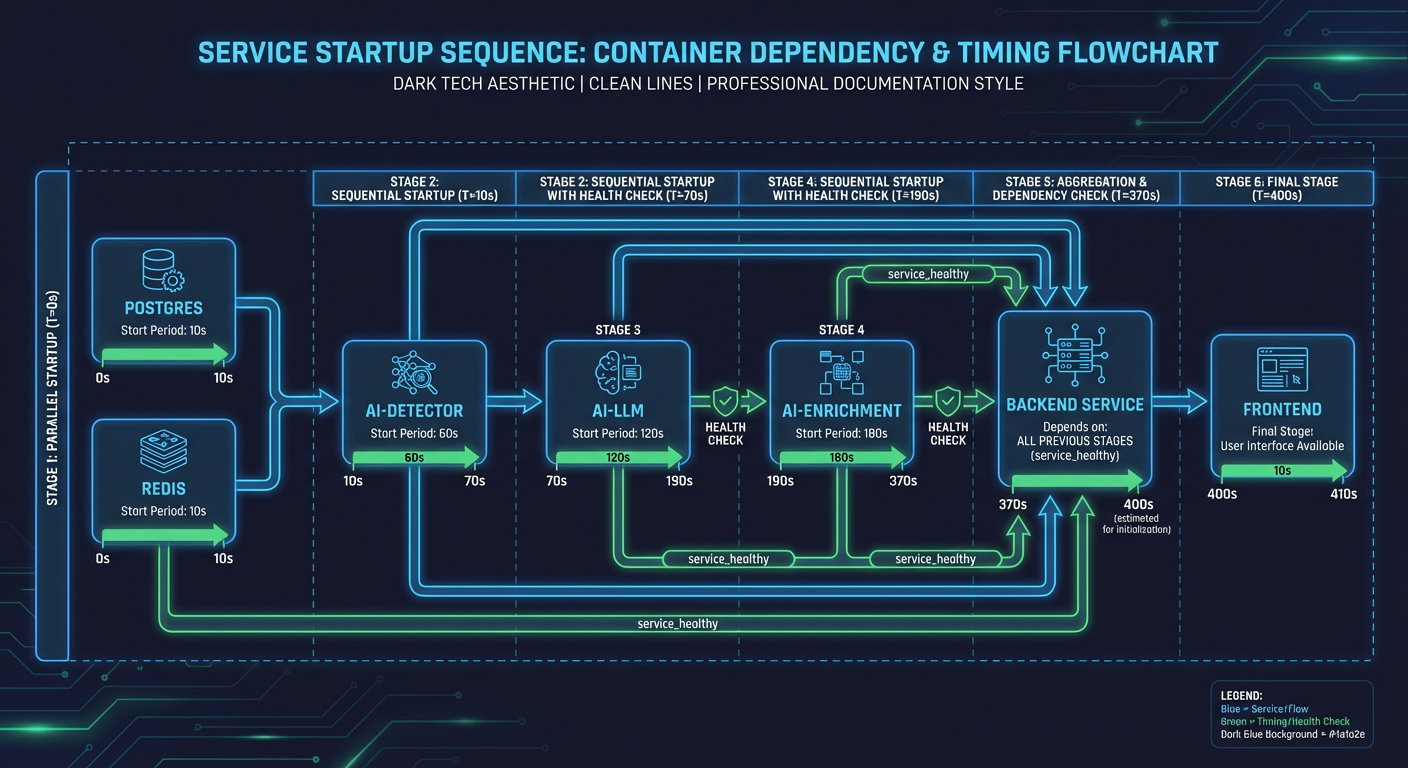
Backend Initialization Sequence
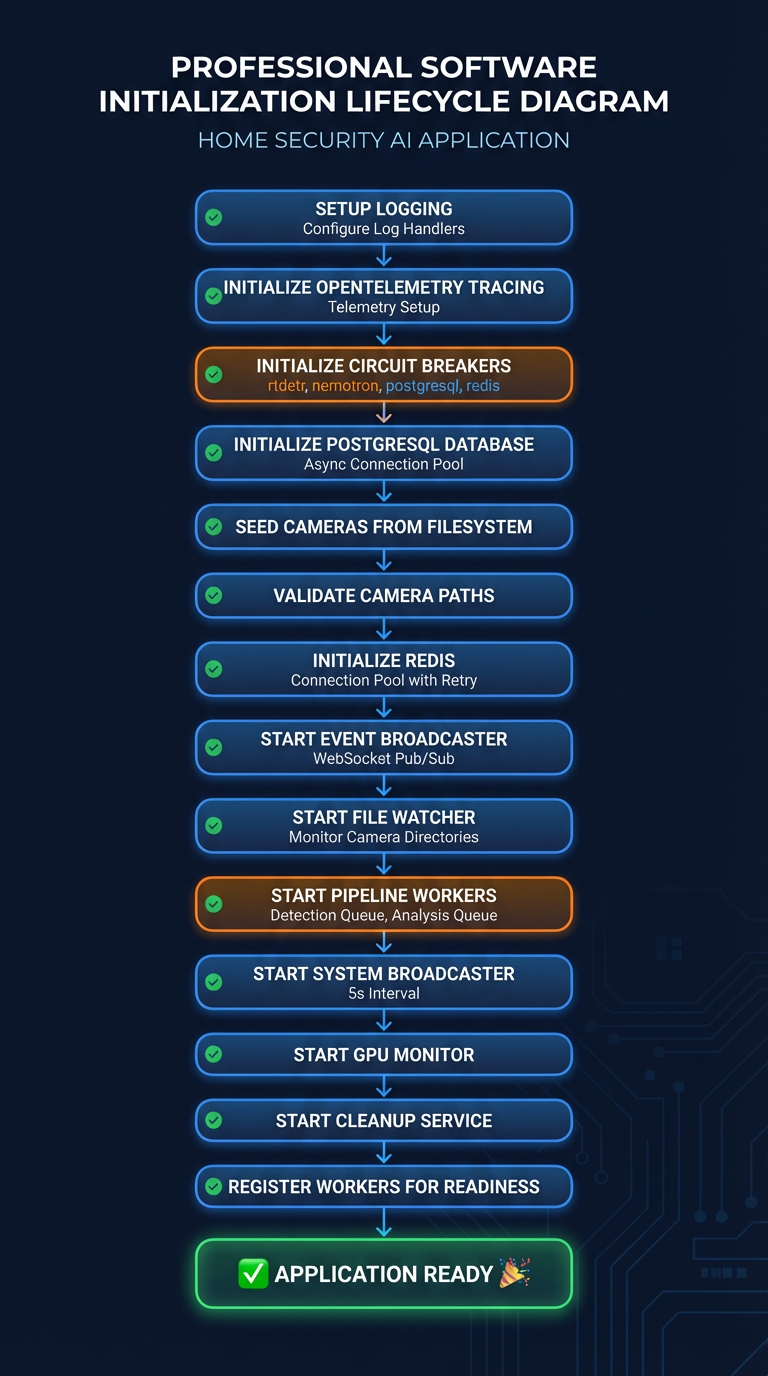
Source: docker-compose.prod.yml:499-513 (backend depends_on)
# Backend startup order
depends_on:
  foscam-init:
    condition: service_completed_successfully
  postgres:
    condition: service_healthy
  redis:
    condition: service_healthy
  ai-llm:
    condition: service_healthy
  ai-gateway:
    condition: service_healthy
  go2rtc:
    condition: service_healthy
flowchart LR
    PG["postgres"] --> BE["backend"]
    RD["redis"] --> BE
    GW["ai-gateway"] --> BE
    LLM["ai-llm"] --> BE
    BE --> FE["frontend"]
    PROM["prometheus"] --> GRAF["grafana"]
    LOKI["loki"] --> ALLOY["alloy"]
    PYRO["pyroscope"] --> ALLOY
Deployment Commands
# Start all services
docker compose -f docker-compose.prod.yml up -d

# Or with Podman
podman-compose -f docker-compose.prod.yml up -d

# Check container status
docker compose -f docker-compose.prod.yml ps

# View logs
docker compose -f docker-compose.prod.yml logs -f backend

# Check GPU usage
nvidia-smi --query-compute-apps=pid,name,used_memory --format=csv

# Rebuild without cache
docker compose -f docker-compose.prod.yml build --no-cache backend
Related Documentation
- Configuration - Environment variables and settings
- Design Decisions - Why containerized deployment
- Architecture Overview - System design