AI Services Configuration
Configure environment variables for AI inference services.
Time to read: ~12 min Prerequisites: AI Installation
Environment Variables
Set these in your shell profile (~/.bashrc or ~/.zshrc) or in a .env file at the project root.
Startup Script Variables
There is no scripts/start-ai.sh — the host-run startup scripts are ai/start_detector.sh, ai/start_llm.sh and ai/start_nemotron.sh (each derives its own paths from its location). These read:
| Variable | Used by | Default |
|---|---|---|
YOLO26_PORT | ai/start_detector.sh | 8090 (.env.example ships 8095) |
NEMOTRON_PORT | all LLM scripts | 8091 |
NEMOTRON_MODEL_PATH | LLM scripts | see each script's model search list |
PROJECT_ROOT | optional | not set by .env.example; only backend/services/lifecycle_manager.py reads it (defaults to /app inside the container) |
Log files: ai/start_nemotron.sh writes to /tmp/nemotron.log; ai/start_llm.sh and ai/start_detector.sh run in the foreground and log to the terminal. In compose, read logs with podman compose -f docker-compose.prod.yml logs ai-gateway / … logs ai-llm.
YOLO26 Detection Server (standalone, host-run)
Configuration for ai/yolo26/model.py when you run it directly on the host. Production detection does not use this server — YOLO26 runs as an ONNX Runtime model inside the ai-gateway Triton container (/yolo26 router); the TensorRT and torch.compile variables below apply only to the standalone host-run server. The server uses TensorRT-optimized engines for efficient GPU inference.
Core Configuration
| Variable | Description | Default |
|---|---|---|
YOLO26_MODEL_PATH | Path to TensorRT engine (.engine) or PyTorch model | /models/yolo26/exports/yolo26m_fp16.engine |
YOLO26_CONFIDENCE | Detection confidence threshold (0.0-1.0) | 0.5 |
YOLO26_CACHE_CLEAR_FREQUENCY | Clear CUDA cache every N detections (0 to disable) | 1 |
PORT | Server port (direct execution) | 8095 |
HOST | Bind address | 0.0.0.0 |
TensorRT Engine Paths
TensorRT engines are GPU-architecture specific. Use the appropriate engine for your deployment:
| Precision | Engine Path | VRAM | Latency | Use Case |
|---|---|---|---|---|
| FP16 | /models/yolo26/exports/yolo26m_fp16.engine | ~2 GB | 10-20ms | Default, highest accuracy |
| INT8 | /models/yolo26/exports/yolo26m_int8.engine | ~1.5GB | 5-10ms | High throughput, multi-camera |
| PT | /models/yolo26/yolo26m.pt (fallback) | ~3 GB | 30-50ms | Development, TensorRT unavail |
Host-run engines are conventionally stored under ${AI_MODELS_PATH:-/export/ai_models}/model-zoo/yolo26/exports/. The gateway path is different: ai/triton/model_repository/yolo26 runs an FP32 ONNX model on the ONNX Runtime CUDA execution provider (NEM-5551 — INT8 ONNX was incompatible with the CUDA provider), so no TensorRT engine is involved in the compose stack.
TensorRT Version Compatibility
TensorRT engines are version-specific. The server automatically handles version mismatches:
| Variable | Description | Default |
|---|---|---|
YOLO26_AUTO_REBUILD | Auto-rebuild engine on TensorRT version mismatch | true |
YOLO26_PT_MODEL_PATH | Path to source .pt model for rebuilding (if auto-rebuild) | (derived) |
When the TensorRT runtime version differs from the engine version:
- The server detects the version mismatch error
- If
YOLO26_AUTO_REBUILD=true, it rebuilds the engine from the .pt model - If rebuild fails or is disabled, it falls back to PyTorch inference
torch.compile Optimization (PyTorch fallback only)
When using PyTorch models (not TensorRT engines), torch.compile provides 15-30% speedup:
| Variable | Description | Default |
|---|---|---|
TORCH_COMPILE_ENABLED | Enable PyTorch 2.0+ graph compilation | true |
TORCH_COMPILE_MODE | Compilation mode | reduce-overhead |
TORCH_COMPILE_BACKEND | Compilation backend | inductor |
TORCH_COMPILE_CACHE_DIR | Cache directory for compiled graphs | (system default) |
Compilation modes:
default- Balanced optimizationreduce-overhead- Faster compilation, good speedup (recommended)max-autotune- Best performance, slower compilation
Note: torch.compile is automatically skipped for TensorRT engines since they are already graph-optimized.
Exporting TensorRT Engines
The standalone yolo26 GPU image was retired 2026-09-23; host-side engine building now runs through the prebuild script (or the gateway's Triton export pipeline ai/gateway/export/export_all.sh for the ONNX path Triton serves):
# Build the FP16 engine for the local GPU (ultralytics .pt -> TensorRT .engine)
./scripts/prebuild-tensorrt-engines.sh yolo26
INT8 calibration requirements (for the archived INT8 export CLI, kept at archive/ai-yolo26-image/export_tensorrt.py):
- 100-500 representative images from your deployment environment
- Cover various lighting conditions and camera angles
- Include all security-relevant object classes
For detailed (retired-era) export options, see archive/ai-yolo26-image/README.md.
NVIDIA Nemotron LLM Server
Host-run scripts: ai/start_llm.sh (dev, Mini 4B) and ai/start_nemotron.sh (Nano 30B, also called by the backend's ServiceHealthMonitor for auto-recovery). In compose the ai-llm container runs llama.cpp instead and reads LLM_MODEL_PATH, GPU_LAYERS, CTX_SIZE, PARALLEL (see below).
| Variable | Used by | Default |
|---|---|---|
NEMOTRON_MODEL_PATH | both scripts | ai/nemotron/nemotron-mini-4b-instruct-q4_k_m.gguf (dev); start_nemotron.sh falls back to /export/ai_models/nemotron/nemotron-3-nano-30b-a3b-q4km/Nemotron-3-Nano-30B-A3B-Q4_K_M.gguf |
NEMOTRON_PORT | both scripts | 8091 |
NEMOTRON_HOST | start_nemotron.sh | 0.0.0.0 |
NEMOTRON_GPU_LAYERS | start_nemotron.sh | 35 (dev script hardcodes 99 = all) |
NEMOTRON_CONTEXT_SIZE | start_nemotron.sh | 12288 (dev script hardcodes 4096) |
LLAMA_SERVER_PATH | start_nemotron.sh | searches /usr/bin/llama-server, /export/ai_models/nemotron/llama.cpp/build/bin/llama-server |
Compose ai-llm variables (from .env.example / compose defaults):
| Variable | Default | Notes |
|---|---|---|
LLM_MODEL_PATH | /models/Nemotron-3-Nano-30B-A3B-Q4_K_M.gguf | exposed to the container as MODEL_PATH |
GPU_LAYERS | auto (all layers) | |
CTX_SIZE | 262144 | llama.cpp total, split across PARALLEL slots; must not be exported to the Python backend — its nemotron_context_window validator caps at 131,072 (see Monitoring) |
PARALLEL | 8 | 8 × 32,768 tokens |
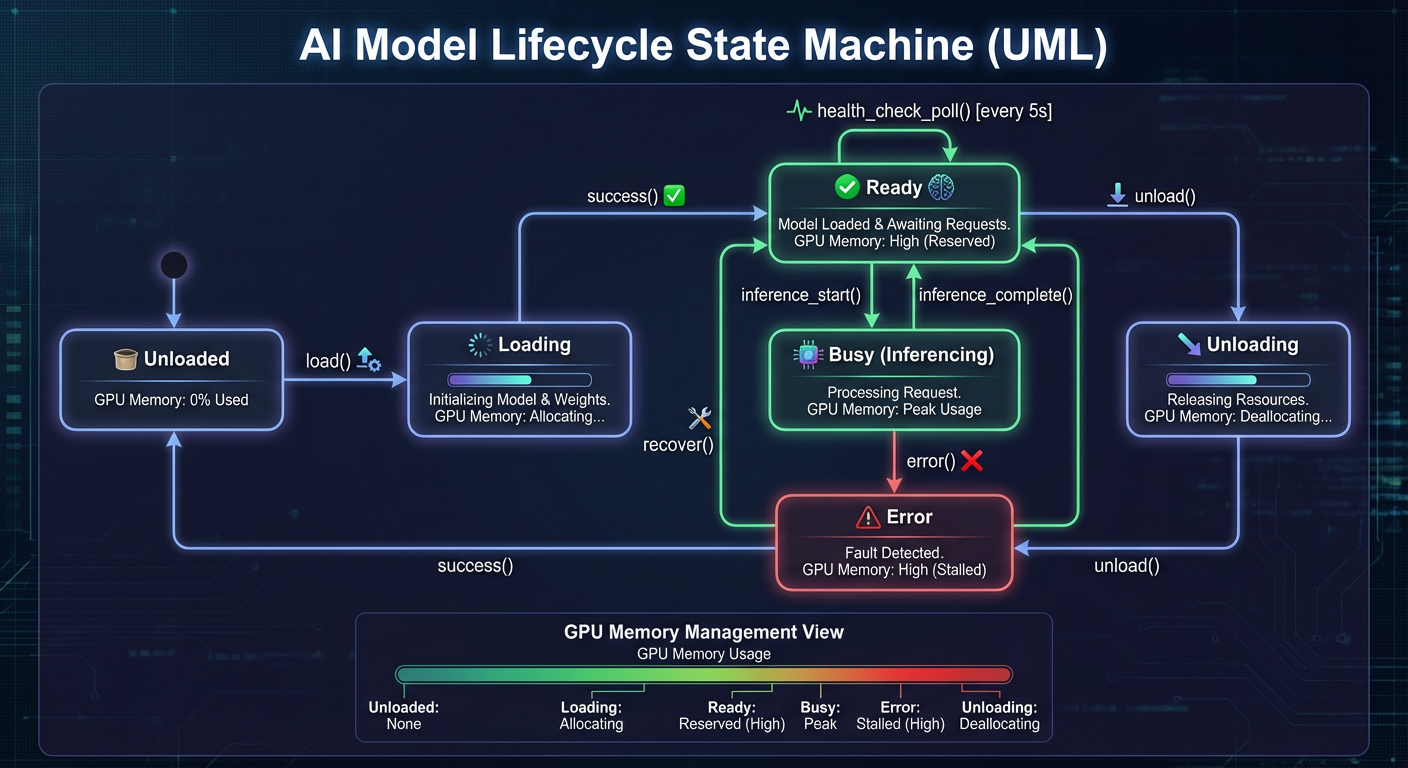
Model Zoo state machine showing model lifecycle transitions: loading, loaded, unloading, and error states.
Model Options:
| Deployment | Model | File | VRAM | Context |
|---|---|---|---|---|
| Production | NVIDIA Nemotron-3-Nano-30B-A3B | Nemotron-3-Nano-30B-A3B-Q4_K_M.gguf | ~14.7 GB | 131,072 |
| Development | Nemotron Mini 4B Instruct | nemotron-mini-4b-instruct-q4_k_m.gguf | ~3 GB | 4,096 |
For comprehensive NVIDIA Nemotron documentation, see /ai/nemotron/AGENTS.md.
Backend Configuration
These configure how the backend connects to AI services (backend/core/config.py):
| Variable | Description | Default |
|---|---|---|
USE_AI_GATEWAY | Route all AI clients through the gateway | false in code, true in compose/.env |
AI_GATEWAY_URL | Gateway base URL when USE_AI_GATEWAY=true | none in code, http://ai-gateway:8090 in compose |
YOLO26_URL | Full URL to the detection router | http://ai-gateway:8090/yolo26 |
NEMOTRON_URL | Full URL to the Nemotron (llama.cpp) service | http://localhost:8091 (compose: http://ai-llm:8091) |
FLORENCE_URL | Florence-2 router | compose: http://ai-gateway:8090/florence |
CLIP_URL | CLIP/SigLIP router | compose: http://ai-gateway:8090/clip |
ENRICHMENT_URL | Heavy enrichment router | compose: http://ai-gateway:8090/enrichment |
ENRICHMENT_LIGHT_URL | Light enrichment router | compose: http://ai-gateway:8090/enrich-lt |
YOLO26_API_KEY | API key for YOLO26 authentication | (none) |
NEMOTRON_API_KEY | API key for NVIDIA Nemotron authentication | (none) |
Setting Up Environment Variables
The backend reads settings from the process environment first, then data/runtime.env, then the .env file at the project root (backend/core/config.py via pydantic-settings). Copy the template once and edit it:
Host-run AI scripts (ai/start_*.sh) inherit variables from your shell, so export them there if you run the services outside compose.
Container Networking
When AI services run in containers, use appropriate host resolution:
For a decision table and copy/paste
.envsnippets for every deployment mode, use: Deployment Modes & AI Networking.
| Platform | Runtime | AI Service URLs |
|---|---|---|
| macOS | Docker Desktop | http://host.docker.internal:8090 |
| macOS | Podman | http://host.containers.internal:8090 |
| Linux | Docker/Podman | http://192.168.1.100:8090 (host IP) |
(The gateway host port is 127.0.0.1:${AI_GATEWAY_PORT:-8090} by default — expose it via a reverse proxy or SSH tunnel before pointing a remote backend at a host IP.)
Production compose DNS (recommended)
When running docker-compose.prod.yml, the backend reaches AI services by compose DNS — these are the values compose itself sets, no .env entries needed:
USE_AI_GATEWAY=true
AI_GATEWAY_URL=http://ai-gateway:8090
YOLO26_URL=http://ai-gateway:8090/yolo26
NEMOTRON_URL=http://ai-llm:8091
FLORENCE_URL=http://ai-gateway:8090/florence
CLIP_URL=http://ai-gateway:8090/clip
ENRICHMENT_URL=http://ai-gateway:8090/enrichment
ENRICHMENT_LIGHT_URL=http://ai-gateway:8090/enrich-lt
Example .env for macOS with Docker:
Example .env for macOS with Podman:
export AI_HOST=host.containers.internal
YOLO26_URL=http://${AI_HOST}:8090/yolo26
NEMOTRON_URL=http://${AI_HOST}:8091
Example .env for Linux:
# Get your host IP
export AI_HOST=$(hostname -I | awk '{print $1}')
YOLO26_URL=http://${AI_HOST}:8090/yolo26
NEMOTRON_URL=http://${AI_HOST}:8091
Detection Settings
Fine-tune object detection behavior:
| Variable | Description | Default |
|---|---|---|
DETECTION_CONFIDENCE_THRESHOLD | Minimum confidence to store | 0.40 in config.py; .env.example sets 0.5 |
FAST_PATH_CONFIDENCE_THRESHOLD | Threshold for fast-path | compose sets 0.90 |
FAST_PATH_OBJECT_TYPES | Types eligible for fast-path | ["person"] in .env.example (commented out) |
[!WARNING] > The fast path is disabled by design.
config.pyshipsfast_path_confidence_threshold = 2.0(an impossible value) and an emptyFAST_PATH_OBJECT_TYPES, because the fast path bypasses enrichment and Nemotron then scores on partial data. Do not lower these unless enrichment is added to the fast path.
Confidence threshold trade-offs:
- Lower (0.3-0.5): More detections, more false positives
- Higher (0.6-0.8): Fewer detections, fewer false positives
Timeout Settings
Control connection and read timeouts:
| Variable | Description | Default |
|---|---|---|
AI_CONNECT_TIMEOUT | Connection timeout (seconds) | 10.0 |
AI_HEALTH_TIMEOUT | Health-check timeout | 5.0 |
YOLO26_READ_TIMEOUT | Detection read timeout | 30.0 (range 5–120) |
NEMOTRON_READ_TIMEOUT | LLM analysis read timeout | 120.0 (range 30–600) |
[!NOTE] Older docs said
YOLO26_READ_TIMEOUTdefaults to60.0;backend/core/config.pycurrently defaults to30.0.
Systemd Services
There are no systemd units for the AI services in this repository — the supported production path is docker-compose.prod.yml (Podman). The only systemd units that ship are monitoring extras (monitoring/cadvisor/cadvisor.service, monitoring/dcgm/dcgm-exporter.service, both rootful).
Complete Example .env
# AI gateway (production compose sets these itself — needed only when the backend
# runs on the host against AI on the host)
USE_AI_GATEWAY=true
AI_GATEWAY_URL=http://localhost:8090
YOLO26_URL=http://localhost:8090/yolo26
NEMOTRON_URL=http://localhost:8091
FLORENCE_URL=http://localhost:8090/florence
CLIP_URL=http://localhost:8090/clip
ENRICHMENT_URL=http://localhost:8090/enrichment
ENRICHMENT_LIGHT_URL=http://localhost:8090/enrich-lt

# Enrichment tier routing (light = /enrich-lt, heavy = /enrichment)
ENRICHMENT_POSE_SERVICE=light
ENRICHMENT_THREAT_SERVICE=light
ENRICHMENT_REID_SERVICE=light
ENRICHMENT_PET_SERVICE=light
ENRICHMENT_DEPTH_SERVICE=light

# ai-llm container (llama.cpp) — CTX_SIZE is for the LLM container only; the
# Python backend's validator rejects values above 131072
LLM_MODEL_PATH=/models/Nemotron-3-Nano-30B-A3B-Q4_K_M.gguf
GPU_LAYERS=auto
CTX_SIZE=262144
PARALLEL=8

# Standalone host-run YOLO26 server only (not used by the compose gateway)
# YOLO26_MODEL_PATH=${AI_MODELS_PATH:-/export/ai_models}/model-zoo/yolo26/exports/yolo26m_fp16.engine
# TORCH_COMPILE_ENABLED=true

# Detection tuning
DETECTION_CONFIDENCE_THRESHOLD=0.5

# Timeouts
AI_CONNECT_TIMEOUT=10.0
YOLO26_READ_TIMEOUT=30.0
NEMOTRON_READ_TIMEOUT=120.0
Next Steps
- AI Services - Start and verify services
- AI Troubleshooting - Common issues and solutions
- AI Performance - Performance tuning
See Also
- Environment Variable Reference - Complete configuration reference
- Risk Levels Reference - Severity threshold configuration
- AI TLS - Secure communications setup