Context: asking the same question different ways

The same word means different things in different corners of your notes. Context is how you tell the graph which one you meant.
You wrote down bias once in a chapter on statistics and once in a chapter on cognition. You wrote queen when you meant the chess piece, and again when you meant the monarch, and again when you meant the Freddie Mercury kind. A search for bias or queen finds all of them. Usually you want one.
Context is the tag you attach to notes when you write them and the filter you attach to queries when you ask them. When the two overlap, the graph knows which sense of the word you meant. This page is about how you write those tags in and how you apply them when you search.
How context shows up in the notes you write
You've already seen it, probably without noticing. In N4L, a line like
is a context line. Everything written below it — until the next ::
line or the end of the chapter — is tagged with books, topics, and
authors. When you later ask a question scoped to one of those tags,
only the notes that carry the tag come back.
You can have several context lines in a single chapter, and you should. A long chapter with one context tag at the top is under-tagged; a short chapter with a context line every few blocks is exactly right. Tags are cheap. You want enough of them that when you come back in six months, the ones you chose act like signposts back to what you were doing when you wrote the note.
Two kinds of context, and how they combine
Context comes from two places at once.
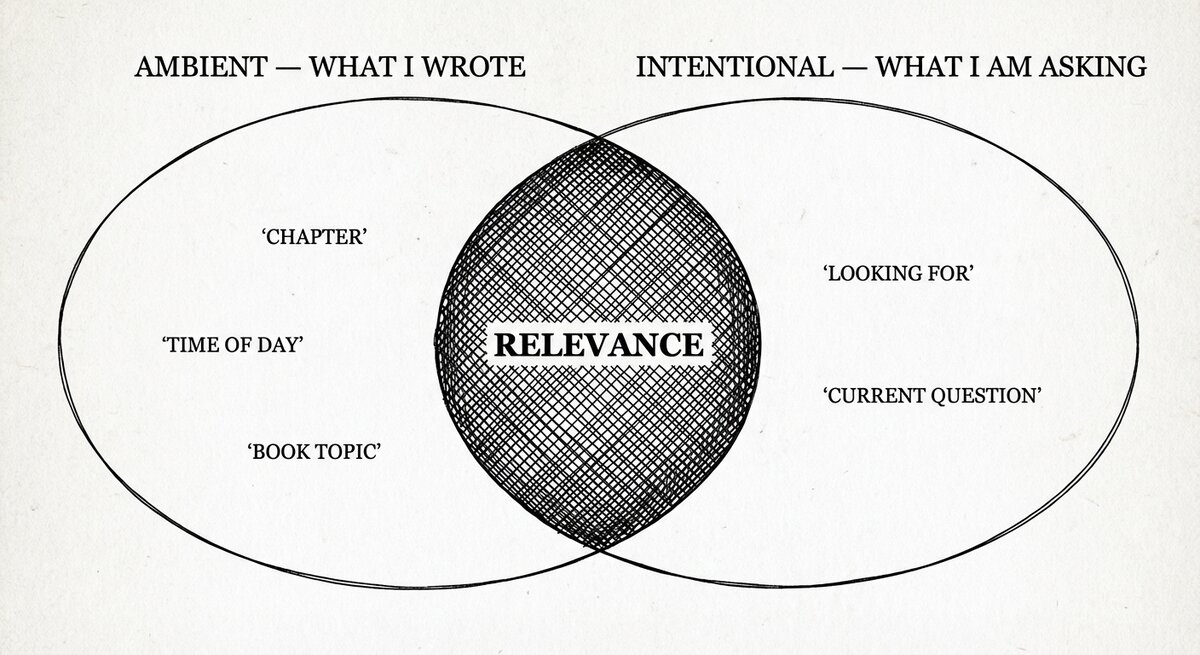
Ambient context is the :: tags :: line you wrote when you took the
notes. It is the context the notes carry with them — the chapter and
scene they were captured in. You do not restate it at query time; it is
along for the ride.
Intentional context is the \context tag clause you add to a
specific query. It is the context you bring to the question — what you
are looking for right now, not what the notes originally remembered.
When you search, both streams feed into the same ranking. Neither wins
by rule of precedence; they both contribute to how well a candidate
matches. In practice this means you can rely on the ambient tags your
notes already carry — you do not have to restate them in every query —
but you can also narrow a specific question with \context when the
ambient tags aren't enough.
Ambient and intentional context both count
Ambient context (the :: tags inherited from where a note was
written) and intentional context (the \context … clause on a
query) are combined by the scoring pass, not precedence-ordered.
Neither stream short-circuits the other. When both are present, a
candidate that matches both ranks higher than one that matches just
one.
Asking the same question two different ways
Write down one topic under two different contexts. Suppose a chapter on cluedo:
- cluedo: Forensic map of a Murder Most Horrid

 :: Dramatis personae ::

 scarlett (id) Miss Scarlett, The Woman in Red, New York socialite.
 plumb    (id) Professor Plumb, University of Oxford.

 :: locations, places ::

 library
 Covent Garden Pub
 24 Summertown Road
Now scarlett is tagged with Dramatis personae and the three locations are tagged with locations, places. A plain search for something that appears in both senses pulls both back. A context-scoped search pulls just one:
searchN4L scarlet \context person
searchN4L "summer" \context place
searchN4L "some car" \chapter cluedo
searchN4L "fork" \context restaurant \chapter chinese
The last query combines two scopes — a context and a chapter. You use whichever is the right lever. A chapter is a big filter; a context is a small one. A query with both is a narrow one.
Why tag at all
When you write notes, you are the only person who will search them. (If you are a team, each person still writes from their own perspective.) The context tags you leave behind are the signposts your future self will follow. They encode not what the note is about — that's the arrow — but where you were when you wrote it. Monday's standup. The restaurant. The chapter on cognition. The project code.
When you come back to a note a year later and can't remember why you wrote it, the context line is how you find your way. A search that matches on context does not just match fewer results; it matches the right results, because it matches the frame of mind the note was written in.
Ambient context and attention
If you've queried the graph a few times in the last hour, recent query context carries forward automatically — the graph knows what you were looking at a few minutes ago, and uses it as a gentle prior. This is time-limited: after a few hours of inactivity the ambient prior decays and your next query starts fresh. It is not a search history; it is the equivalent of "you were just asking about this chapter, are you still in that headspace?"
You do not configure this. It is there if you want to lean on recent
activity (\remind makes it explicit) or opt out of it (\never).
Most of the time it does the right thing quietly.
Writing contexts that will still make sense later
A few practical rules, learned the hard way.
- Tag in whole words, not abbreviations.
:: standup monday ::beats:: sm ::— your future self may not remember whatsmstood for. - Tag the frame, not the content.
:: cognition ::on a block of notes about biases is better than:: biases ::— becausebiasesis the content of the notes, and the context should be the frame around the content. - Don't tag everything. A chapter of notes all about the same
thing doesn't need twenty
::lines; one or two is enough. The point is to separate the subsections, not to label every line. - Reuse tags across chapters. If three different projects all
touch on decision making, tagging each of them
::
  decision-making ::
lets a single context-scoped query pull them together later. Tags are a soft index; reuse is what makes them powerful. - It's personal. What reminds you may not remind anyone else. That is fine. Your context tags are for your future self, not for a general audience.
A technical note about tagging nodes
Context in SSTorytime tags the arrows in your notes — the links
between nodes — rather than the nodes themselves. For most queries this
is invisible; you tag a block of notes with ::, and everything inside
picks up the tag. It matters only in one case: if you create isolated
nodes with no outgoing or incoming arrows (e.g. by pasting in a word
list with no links), those nodes carry the tag any rather than the
tag you intended. The fix is to add at least one arrow from each node.
A one-word note with no arrows is a note with no context.
Socialising knowledge
A final, non-mechanical point. A wiki or a graph database is not a place for shared knowledge the way a conversation is. You cannot drop notes into a searchable store and expect others to find them; they have to know the store exists, and they have to have some idea what to look for. Context tags — the way you label your own notes — are the way you talk to your future self, but they are also the way you talk to anyone else who comes after you. Tags that make sense to you and also make sense to your colleagues are worth double.
The project slogan goes:
It's not knowledge if you don't know it.
Context is how you make sure you can still find it later.
Where to go next
-
Finding things
The shape of a question — topic, thing, person. With a half-dozen queries against the reading list.
-
Finding paths
When you want the chain of arrows between two things, not just their neighbourhoods.
-
Search recipes
Ten copy-pasteable patterns, including context-scoped searches.